Friday , 2 January 2026
Home Tech News Streaming Device News Firestick Blocks Are Now LIVE: The Exact Warning & Full List of Affected Apps
Streaming Device News

Firestick Blocks Are Now LIVE: The Exact Warning & Full List of Affected Apps

Amazon has begun device-level blocks on Fire TV. Here’s the warning you’ll see, how the 2-stage system works, and which apps are currently flagged.

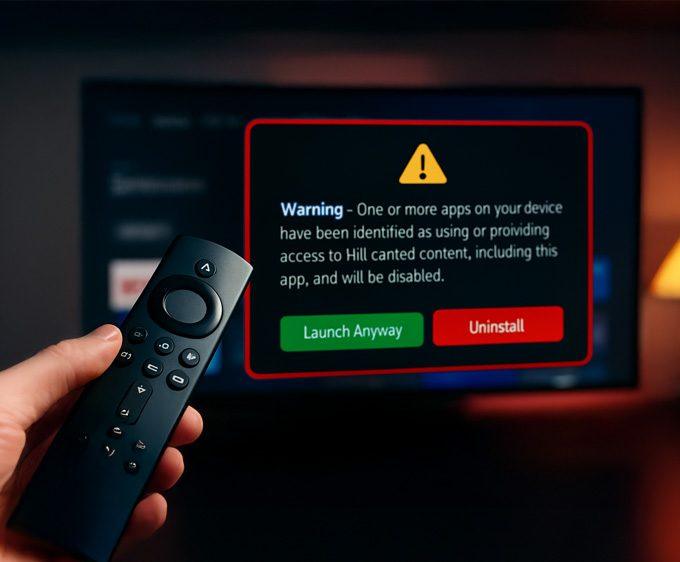
Firestick warning message for unlicenced content

Amazon has begun device-level blocks on Fire TV devices, and the Firestick warning message is now appearing in more regions. After months of rumours, early tests, and partial enforcement, the crackdown is officially rolling out. As a result, Firestick users are starting to see a new on-screen alert confirming when an app has been flagged.

For more updates like this, visit our Streaming Device News section, where we track every major Fire TV and Google TV change as it happens.

If you own a Firestick, Fire TV Cube, or Fire TV Smart TV, this enforcement affects how certain apps behave. The Firestick warning message is real; it is part of a staged rollout and includes a temporary launch window before the app becomes permanently blocked. Because of this, users should understand what the warning means and how the new 2-stage system works.

If you’re new to Firesticks and want to make sure your setup is fully optimised, start with our 👉 Firestick 2025 Setup Guide.

Below is the exact warning, how the block functions, what it means for your apps, and the complete list of apps currently reported as blocked.

What the Firestick Warning Message Looks Like

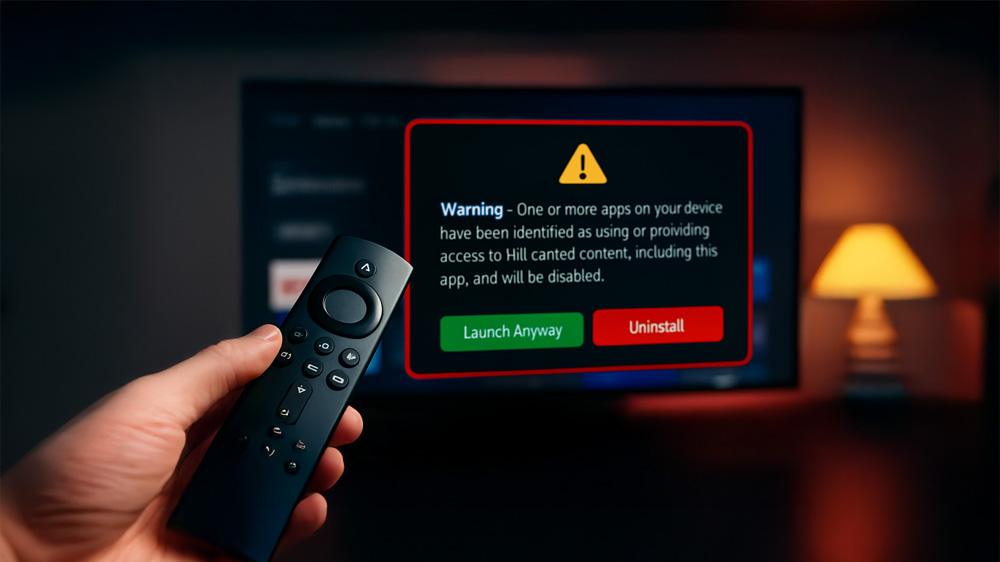
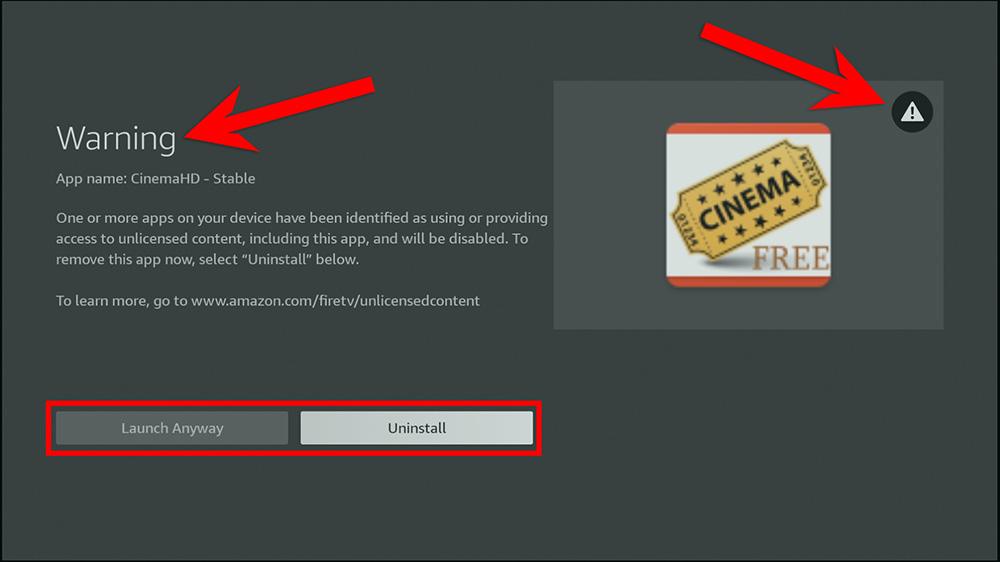
When a Fire TV app has been flagged, users now see the following message:

Warning – One or more apps on your device have been identified as using or providing access to unlicenced content, including this app, and will be disabled.

Several major outlets have confirmed Amazon’s enforcement, including:

This Firestick warning message appears the moment you click an affected app. After that, you are given two choices:

  • Launch Anyway (temporary access)
  • Uninstall (removes the app immediately)

Together, these confirm Amazon’s 2-stage block system.

You can also browse our wider Tech News coverage for all Fire TV OS changes, Google TV updates, and streaming platform rollouts.

Stage 1 → Stage 2: How the Block Works

Amazon’s new enforcement system does not disable flagged apps instantly. Instead, the process happens in two stages:

Stage 1 — Warning Window (Temporary Access)
You can still open the flagged app using Launch Anyway. During this time, the app’s home-screen tile will show a small exclamation mark.
This stage confirms the Firestick warning message has been triggered.

Stage 2 — Full Block (No Access)
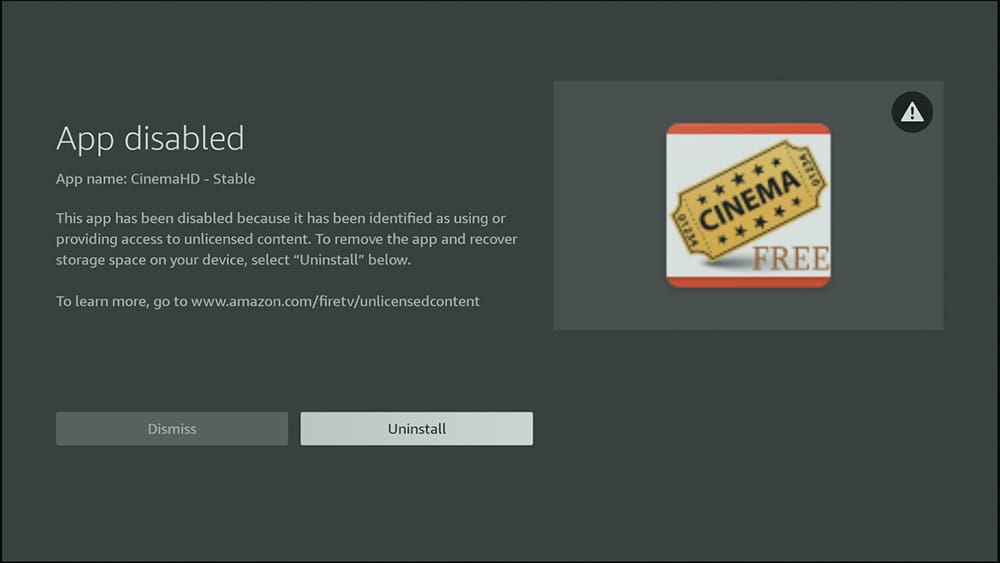
After some time, the app stops launching entirely. The warning disappears, and the app simply fails to open.

📌 Important:
Amazon has not confirmed how long the delay is between Stage 1 and Stage 2. Because this is a rolling enforcement, timing varies by region, app, and device.

This aligns with broader industry movement — such as Google moving toward verified sideloading by 2026. Read more on that here: 👉 Google Bans Sideloading on Android TV & Google TV by 2026.

For the bigger picture around Amazon’s plans, read our deep-dive on Vega OS: Amazon’s Rumoured Replacement for Fire OS — the next major shift behind Firestick updates.

If your device starts behaving slowly or apps lag after the warning appears, you may also want to check: 👉 How to Clear Cache & Improve Firestick Performance.

This Is NOT the Same as Earlier “Malicious App” Firestick Warning Messages

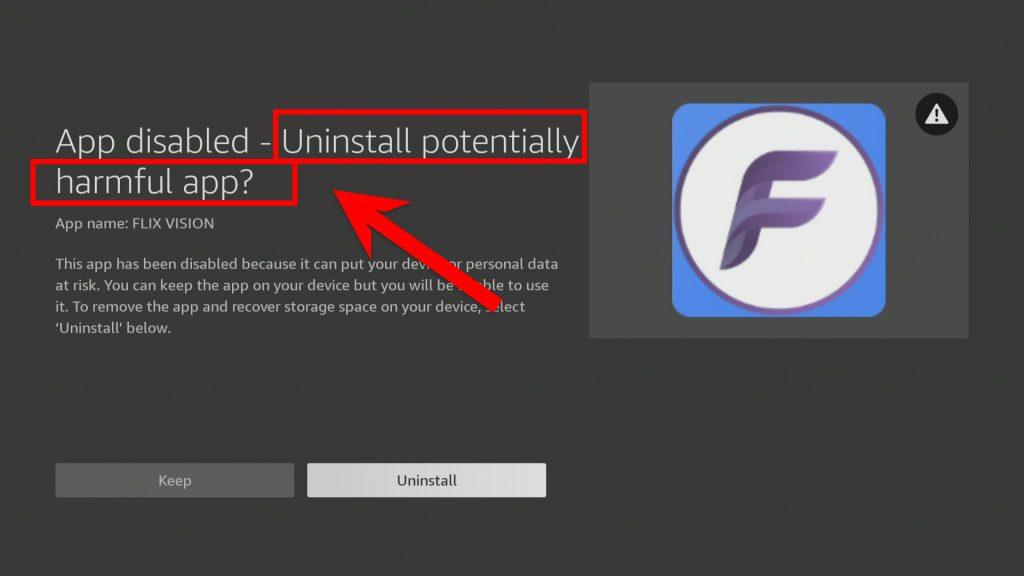
Earlier this year, some Firestick users saw messages claiming certain apps were “potentially dangerous.” Those warnings came from Amazon’s security scanning system and were not tied to licensing.

Firestick previous warning message about potentially harmful apps

This new warning is different because it:

Because of this distinction, apps flagged by the new Firestick warning message are being targeted for content-related reasons, not security issues.

Full List of Apps Currently Reported as Blocked

Based on reports from users, community forums, and our own tests, the following apps have shown the new Fire TV warning:

Confirmed Blocked Apps

  • StreamFire
  • FilmPlus
  • Nova TV
  • Rapid Streamz
  • Flix Vision
  • UK Turks
  • Smart Tube
  • Ocean Streamz
  • Cinema HD

If you’ve noticed an app not on this list, let us know by leaving a comment below.

This list is for reporting only and reflects user-submitted information. It does not endorse or encourage any app. Always access content legally.

How to Tell If an App Has Been Flagged

New Firestick warning allows users to "Launch anyway" or "Uninstall"

Look for these signs:

1. Exclamation mark on the app tile
A small “!” appears in the corner of the icon.

2. Warning message opens when you launch the app
This confirms the app is flagged.

3. App stops launching entirely
This indicates Stage 2 has begun.

If your Firestick becomes unstable during this process, use: 👉 Fix Streaming Lag & Buffering on Fire TV Devices.

Will a VPN Fix This Firestick Warning Message?

No. A VPN cannot bypass a device-level block because the restriction is implemented inside Fire OS, not your network.

But if you want privacy or travel-based region switching, here are legitimate guides:

👉 VPN for Firestick & Google TV: Secure Streaming Guide
👉 Set Up VPN on Router Easily (2025 Guide)

But again — VPNs do not unblock apps that Amazon has disabled.

What Should You Do Now?

If you rely mainly on official streaming apps, nothing changes.

However, if an app you use is flagged:

If your Firestick needs a full reset after issues:
👉 How to Reset & Factory Restore Your Fire TV or Google TV

For ongoing coverage of Fire TV changes, you can always check the latest updates in Streaming Device News.

Frequently Asked Questions

What is the exact Firestick warning message?

The message says: “Warning – One or more apps on your device have been identified as using or providing access to unlicenced content, including this app, and will be disabled.”

Can you still open the app after seeing the warning?

Yes. This is a 2-stage block. First you get a warning with temporary access, then a full block.

How long before the app becomes fully blocked?

Currently unknown. Amazon has not provided a timeline.

Will a VPN unblock the app?

No. The block is enforced on the device, not by your internet provider.

How can I check which apps are affected?

You can view the full list of confirmed blocked apps on this page and the ongoing list at unboxd.tech.

Final Thoughts

This is the most significant enforcement change Amazon has made to Fire TV in years. The warning is real, the block is real, and the rollout is accelerating.

We will continue tracking reports across all Fire TV models.
You can always find an up-to-date blocked app list on this page as new reports come in.

To stay updated on Firestick changes, check out our streaming news hub: 
👉 Streaming Device News

And if you want to improve your Firestick overall, read:
👉 13 Best Firestick 4K HDR Settings

Written by
Tanya

Tanya is the founder of unboxd.tech, where she shares guides, reviews, and tips on streaming devices and apps. She focuses on making streaming simple with practical fixes and smart home insights.

7 Comments

Leave a Reply

Your email address will not be published. Required fields are marked *

Related Articles

Google Softens Sideloading Blocks on Android: What “Experienced Users” Need to Know

Android users have been watching closely as Google Android sideloading rules began...

NVIDIA Rolls Out Shield Experience 9.2.2 — Here’s What’s New!

The NVIDIA Shield TV line continues to impress. The company pushed out...

Freely Unveils New Streaming Devices: Plug In & Watch Free UK TV

For years, UK viewers have relied on Freeview and Freesat for free-to-air...

Amazon Prime Day 2025: Biggest Deals Coming October 7–8

Amazon has confirmed that Amazon Prime Day 2025 will run October 7–8....